Back to All Solutions

Solution Detail

Dedicated-Link Bandwidth Monitoring

Flow Hunter Network Traffic Analysis + BestPerf Network Quality Measurement

For ongoing dedicated-link operations: identify which links, directions, periods and applications consume bandwidth, how long capacity will last, and whether to expand or reschedule traffic first.

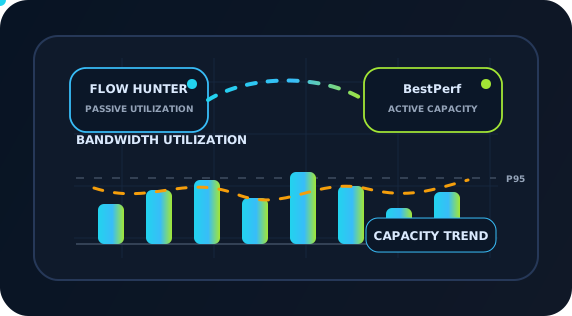
Dedicated-link bandwidth, utilization and capacity trend diagram

Products

2

Scenarios

12

Evidence

PCAP

Why

Requirements

Many link issues involve sustained peak-hour utilization, brief bursts, backups competing with daytime work, abnormal cross-cloud synchronization or individual hosts creating congestion. Average interface utilization can hide minute-scale bursts, directional imbalance, five-minute peaks, busy-hour 95th percentiles and actual traffic sources.

Bandwidth monitoring must also align ingress and egress at CE/PE handoffs, enterprise and carrier billing methods, cloud/data center directional bottlenecks, QoS treatment and backup schedules. Correlate bandwidth curves, sessions, application classes and active capacity measurements to answer these questions.

Flow Hunter continuously observes real traffic and identifies top applications, hosts, sessions, protocols, VLANs, subnets, bursts and causes. BestPerf schedules available-capacity, TCP goodput and load-quality tests. Together they explain high utilization by direction, time, application, capacity threshold and expansion trigger.
Topology

Test and Deployment Topology

STEP 1CE/PE Handoff or Cloud Circuit Entrance
STEP 2Bidirectional Mirroring / TAP for Ingress and Egress
STEP 3Flow Hunter Passive Utilization and Top-Application Analysis
STEP 4BestPerf Active Two-Endpoint Capacity Measurement
STEP 5QoS, Top Hosts, Sessions and Application Drill-Down
STEP 6Five-Minute Peaks, Busy-Hour 95th Percentile, Trends and Capacity Thresholds
STEP 7Expansion Triggers, Backup Scheduling and Billing Review

How

Implementation

1

Define Link Boundaries, Directions and Billing Methods

Inventory MPLS VPN, internet, cloud, data center, branch and cross-region circuits. Record CE/PE handoffs, committed and burst bandwidth, CIR/PIR and provider billing methods. Define ingress, egress and inter-site directions consistently to prevent enterprise/provider utilization disputes.

2

Collect Bidirectional Utilization, Peaks and Thresholds

Mirror both directions at CE/PE handoffs, cloud entrances, core exits or data center links into Flow Hunter. Track averages, five-minute peaks, busy-hour 95th percentiles, daily/weekly/monthly peaks and trends. Mark thresholds such as 70%, 80% and 90% to distinguish sustained shortages, bursts, directional congestion and scheduled workloads.

3

Drill into Top Applications, Hosts, Sessions and QoS Queues

Break bandwidth curves down by application, host, session, protocol, port, VLAN, subnet and QoS queue. For each congestion window, identify conferencing, object storage, database synchronization, distribution, backups, log uploads, artifact repositories, SaaS or scanning traffic and its direction.

4

Identify Backup, Synchronization and Burst-Task Windows

Align bursts with the business calendar. Check backups, cross-cloud synchronization, warehouse extraction, log uploads, registry synchronization, video uploads and batch jobs for production interference. Consider rate limits, rescheduling, queue changes, routing or concurrency controls; assess expansion for sustained demand that cannot be managed.

5

Calibrate Available Capacity and Quality under Load with BestPerf

Schedule measurements at both endpoints during quiet periods, peaks, changes and suspected bottlenecks. Measure TCP goodput, directional differences, quality under load and available capacity. If throughput drops before interfaces saturate, investigate provider limits, cloud policies, queues, endpoint bottlenecks, TCP windows or link quality.

Product Stack

Main Test and Analysis Tools

Result

Expected Outcomes

Resolve Bandwidth Disputes with Application Evidence

See both directions, five-minute peaks, busy-hour 95th percentiles, bursts, top applications, hosts, sessions and QoS queues rather than average interface utilization alone.

Make Capacity Decisions Easier to Explain

Distinguish sustained growth from a few poorly scheduled jobs before buying bandwidth. Trends, utilization thresholds and expansion triggers support budgets, procurement and supplier discussions.

Attribute Problems to the Right Domain Faster

Compare bursts and throughput drops with real traffic, active tests and billing methods to distinguish provider limits, cloud policies, enterprise congestion, queue settings, endpoint limitations and application issues.

Assess Capacity and Quality Separately

BestPerf distinguishes low utilization, degraded link quality, endpoint bottlenecks and reduced TCP goodput, avoiding the assumption that every slowdown needs more bandwidth.

Produce Reviewable Reports and Evidence

Deliver more than throughput or delay figures: include topology, parameters, timelines, quality curves, key sessions, anomalies, PCAP extracts and retest results. Development, testing, operations, vendors and customers can discuss the same evidence rather than relying on screenshots, verbal descriptions and repeated debate.

References

Related Standards and Methods

Next Step

Need to Apply This Solution to Your Network?

NetAccura can create a test topology, parameter table and POC plan based on your links, models, application protocols, available PCAPs and SLA goals.